
How do you ground AI answers in your own business data?
Why a model alone cannot know your hours, prices, or policies, and how retrieval, permissions, live tool calls, and testing make AI answers traceable to your own sources.

To ground AI answers in your own business data, the assistant must look up your approved documents and live systems at the moment a question is asked, answer only from what it found, cite where each fact came from, and say "I don't know" when nothing relevant comes back. Grounding is built, tested, and monitored, not switched on.
This guide covers why models make up business facts, how retrieval-augmented generation works step by step, how to keep answers current and private, when to call a live system instead of searching a document, and how to prove the whole thing works before and after launch.
Why doesn't an AI model already know your hours, prices, and policies?
A language model is a system trained on a large body of text to predict likely next words. What it learned is frozen at training time, and your Saturday service hours, this month's pricing rules, and your return policy were almost certainly not in that text in any reliable form.
Asked anyway, a model can still produce a fluent answer. The National Institute of Standards and Technology (NIST) calls this confabulation, the production of "confidently stated but erroneous or false content," known colloquially as hallucinations or fabrications [2]. NIST explains that confabulations are a natural result of how generative models are designed, because they generate outputs that approximate the statistical distribution of their training data [2]. NIST also warns that outputs may include confabulated logic or citations that purport to justify an answer [2]. A made-up source is still made up.
The Open Worldwide Application Security Project (OWASP) lists misinformation among its Top 10 risks for large language model applications (2025 edition, the latest on its site as of October 2026). It describes hallucination as the model filling gaps in its training data using statistical patterns without truly understanding the content, and names overreliance, users trusting output without verifying it, as the issue that makes it worse [6].
So the fix is not a prompt that says "be accurate." It is giving the model the right facts at the right time, in a system designed so it cannot quietly fill gaps.
What is retrieval-augmented generation (RAG)?
Retrieval-augmented generation (RAG) is a method where an AI system first searches an outside knowledge source for relevant passages, then generates its answer using those passages. The term comes from a 2020 research paper by Lewis and colleagues, accepted at NeurIPS 2020, which combined a model's built-in "parametric" memory with a searchable "non-parametric" memory: an index of documents [1].
Two points from that paper matter for businesses. First, the authors noted that providing provenance for a model's decisions and updating its world knowledge remained open research problems for models that rely only on what they learned in training [1]. Second, they showed that the retrieval index can be "hot-swapped" to update the model without retraining it [1]. They also described the memory as human-readable and human-writable, so it can be updated by editing the document index [1].
That is the core promise of grounding: when your price list changes, you change the source, not the model.
How does a RAG pipeline work, step by step?
A production RAG system has two halves: indexing runs whenever content changes, and answering runs on every question.
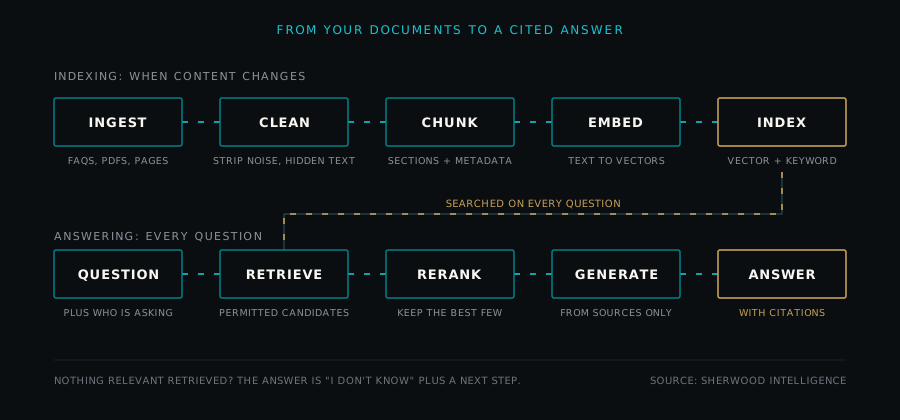
Indexing
- Ingest. Collect the approved sources: FAQ pages, policy documents, listing descriptions, service menus. Record for each one its owner, its effective date, and who may see it.
- Clean. Strip navigation menus, repeated footers, and formatting debris. Check for hidden text. OWASP describes a scenario where a resume with white text on a white background carried instructions to the AI screening it, and recommends validating all documents before they enter the knowledge base and using text extraction that detects hidden content [4]. OWASP calls the broader pattern indirect prompt injection: instructions arriving through external sources such as websites or files rather than from the user [7].
- Chunk. Split documents into passages small enough to retrieve precisely. The original RAG paper split each Wikipedia article into disjoint 100-word chunks [1]. Business content usually deserves smarter boundaries, covered in the next section.
- Embed. An embedding is a list of numbers that represents the meaning of a passage, so that passages with similar meaning sit close together. Each chunk gets one, and every chunk and every question must be embedded with the same model.
- Index. Store the embeddings, the raw text, and the metadata (source, effective date, permissions) in a searchable index. Many production systems also keep a keyword index of the same text.
Answering
- Retrieve. Embed the question with the same model, run vector search (and keyword search, if you use it), and pull back a set of candidate chunks, with the asker's permissions applied as a filter before ranking.
- Rerank. A reranker is a second, slower model, often a cross-encoder, that reads the question and each candidate together and reorders them by relevance. Keep only the best few.
- Generate with citations. Give the model the question, the top passages, and firm instructions: answer only from these passages, cite each one used, treat passage text as information rather than instructions, and say so if the passages do not contain the answer.
How should you chunk business documents?
Chunking is where many grounded assistants quietly fail. Too large buries the answer in noise; too small loses the context that makes it correct.
| Chunking approach | How it works | Strength | Trade-off |
|---|---|---|---|
| Fixed size | Every N words or tokens | Simple and predictable | Can split a rule from its exception |
| Fixed size with overlap | Each chunk repeats the end of the previous one | Fewer broken sentences | More storage, more near-duplicate results |
| Structure-aware | Split on headings, list items, table rows | Keeps a policy section whole | Depends on well-formatted sources |
| One record per chunk | One FAQ pair, one listing, one service | Very precise retrieval | Loses cross-record context |
| Small chunk, larger context | Search small passages, then send the surrounding section to the model | Precise search, complete answer | More moving parts to build and test |
A practical rule: a chunk should answer one question correctly on its own. If a policy says cancellations within 24 hours incur a fee except for weather, the exception must travel with the rule. Attach metadata to every chunk (document title, section heading, effective date, permission level) so the system can filter and cite it.
What is the difference between keyword, vector, and hybrid search?
Keyword search matches the words in the question to the words in the documents, typically ranked by a classic scoring method such as BM25. It is excellent for exact identifiers: a stock number, a street address, a part name, an MLS number.
Vector search compares embeddings, so it finds passages that mean the same thing even when the words differ. "Are you open on the weekend?" can match a passage titled "Saturday service hours."
Hybrid search runs both and merges the two ranked lists, commonly with a rank-based method such as reciprocal rank fusion, then often passes the merged list to a reranker. For business data it is usually the safer default, because customers ask both ways.
The original RAG paper itself shows why neither method wins everywhere. When the authors swapped their learned retriever for a word-overlap retriever (BM25), BM25 performed best on a fact-verification task (FEVER), which the authors suggest may be because its claims are heavily entity-centric, while learned retrieval did better on all the other tasks [1]. As a rule of thumb, names and numbers favor keywords, and paraphrased questions favor vectors.
How do you keep AI answers current?
A grounded assistant is only as current as its index.
- Name one source of truth per fact type. If hours appear on the website, in a PDF, and in an old email template, pick the one that wins and index only it.
- Set a re-indexing cadence that matches how fast the fact changes. Re-index on change for policies and FAQs, at least daily for listing descriptions, and never rely on documents at all for facts that change by the hour.
- Store effective dates. Tag every chunk with when it took effect and, where known, when it expires, and filter out expired content at retrieval time. NIST describes high-integrity information as information that "can be linked to the original source(s) with appropriate evidence" and that "creates reasonable expectations about when its validity may expire" [2].
- Delete stale content from the index, not just from the website. When a policy is withdrawn, remove its chunks and embeddings. OWASP notes that knowledge conflicts can occur when data from multiple sources contradict each other, and when a model cannot supersede what it learned in training with newer retrieved data [4]. Two versions of a price in the index invite the model to pick the wrong one.
How do you make sure users only retrieve what they are allowed to see?
Access control is the rule that each person can retrieve only the documents they are permitted to see. In a grounded assistant, this has to happen inside retrieval, not in the model's instructions.
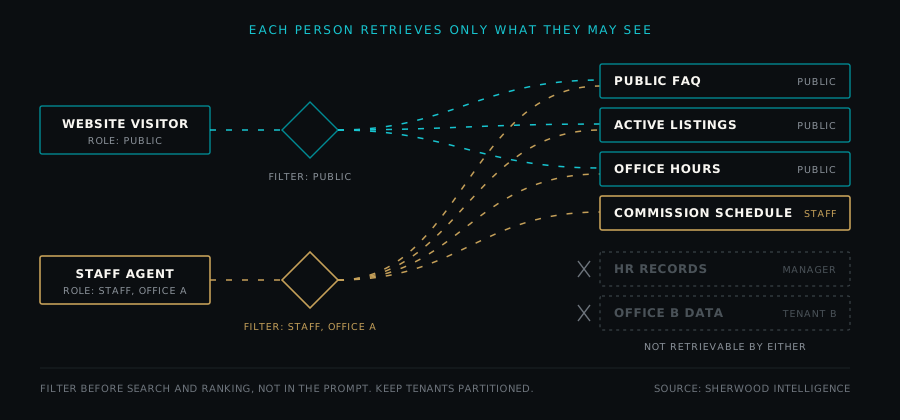
- Per-document permissions. Carry each source's permissions onto every chunk at ingest, and apply them as a filter before search and ranking. Filtering only after a top-k search lets restricted text travel through the pipeline and can leave the asker with too few usable results. If a chunk is never retrieved, it can never be quoted.
- Identity on every question. Retrieval must know who is asking: anonymous visitor, logged-in customer, staff member, or manager.
- Tenant separation. A tenant is one customer organization in a shared system. OWASP warns that when multiple classes of users share the same vector database there is a risk of context leakage between them, and recommends permission-aware stores with strict logical and access partitioning of datasets [4].
- Do not trust the prompt to keep secrets. OWASP notes that system prompt restrictions on what a model returns may not always be honored and could be bypassed via prompt injection [5]. It recommends the principle of least privilege: "Only grant access to data that is necessary for the specific user or process" [5].
- Remember that embeddings are data too. OWASP lists embedding inversion, recovering source text from embeddings, as a risk [4]. Protect the index like you protect the documents.
How should an AI assistant cite its sources?
A citation is a pointer from a statement in the answer to the passage that supports it. Good citations let a customer check the claim and let you audit the answer later.
- Cite at the level of the claim, not one source list at the bottom.
- Show a human-readable label, such as "Service Department Hours, effective 2026-09-01," not an internal file ID.
- Verify citations in code where possible: confirm the cited chunk was actually among the retrieved passages.
- Review them. NIST suggests reviewing and verifying sources and citations in AI outputs both before deployment and during ongoing monitoring [2].
When should an AI assistant say it does not know?
Saying "I don't know" is a designed behavior. Build it in for these cases:
- Retrieval returns nothing above a relevance threshold you have tested.
- The passages are on a related topic but do not answer the question.
- Two current sources disagree.
- The only matching content has expired.
- The question needs a judgment a person should make: an exception, a discount, a dispute.
- A live system that should answer is unavailable.
A good refusal is short, honest, and useful: "I don't have this month's pricing for that service. I can have someone call you back today, or you can reach the office directly." For the plain-language view of that handoff on the phone, see what an AI receptionist actually does. Then log it. Every "I don't know" is a signal about a gap in your content.
Why should live facts like prices and availability come from tool calls, not documents?
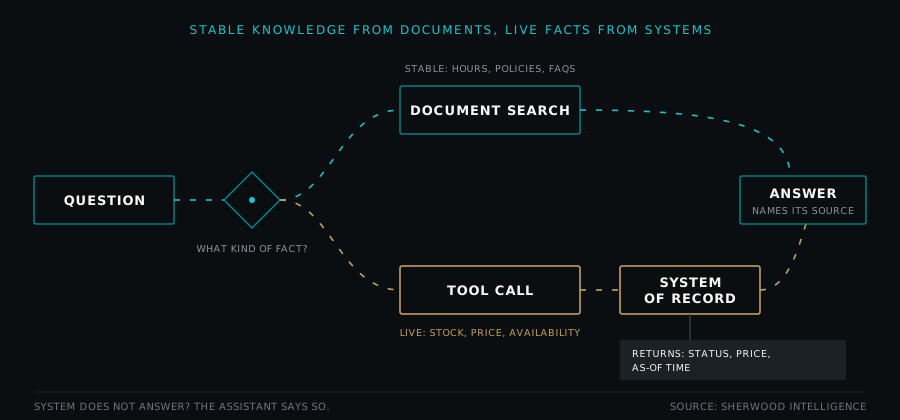
Some facts should never come from a document. A tool call is when the AI asks a connected business system for a specific answer, such as checking inventory or a calendar, instead of searching text. The system returns structured data; the model phrases it.
| Fact type | Where it should come from | How fresh it must be | Example |
|---|---|---|---|
| Hours, policies, and FAQs | Approved documents with effective dates | Re-index on change; expire old versions | Dealership service department Saturday hours |
| Listing descriptions | Listing records, indexed as one record per chunk | At least daily | Bedrooms, bathrooms, square footage as entered on the listing |
| Listing status and price | Tool call to the listing system | At the moment of the question | Whether a listing is active, pending, or sold |
| Vehicle inventory and price | Tool call to the dealership inventory system | At the moment of the question | Whether a stock number is still on the lot |
| Appointment availability | Tool call to the scheduling system | At the moment of the question | Next open service slot |
| Quotes and pricing rules | Tool call to a pricing function that applies the rules | At the moment of the question | Home services quote that depends on job type and timing |
Tool calls bring their own discipline. Grant read-only access unless a write is truly needed, return an as-of time with every record, and if the tool fails, have the assistant say it could not check rather than guess from an old document. For the pricing side in more depth, see why your AI should never guess prices.
What does it look like to ground AI answers in business data?
A real estate office. The FAQ, showing process, and office hours are documents with effective dates. Listing descriptions are indexed one listing per chunk, with the address and listing ID as keyword fields so "Is 1420 Oak available?" hits the right record. Status and price come from a tool call, because both can change during the day. The assistant reports only what the listing data says, such as bedrooms or lot size as entered, and routes questions that call for an opinion or advice to a licensed agent. Commission schedules and transaction files are staff-only.
A car dealership. Sales and service hours live in a dated document, since they often differ. Inventory, including stock number, trim, mileage, and advertised price, comes from a tool call, so a vehicle sold an hour ago is not offered again. Hybrid search matters here: customers type exact stock numbers and also ask for "a hybrid SUV under my budget." When the inventory system is unreachable, the assistant says it cannot confirm availability and offers a callback.
A home services company. Pricing is usually a set of rules, not a number: a service call fee, an after-hours rate, a minimum charge, and jobs that need an on-site estimate. Rules in a PDF invite the model to do arithmetic on paraphrased text, so a pricing function applies the rules to structured inputs (job type, time, address zone) and returns either a figure with the rule that produced it or "needs an on-site estimate." The assistant explains the result and never invents a discount.
How do you test whether a grounded AI assistant is accurate?
Grounding is a claim, and claims need evidence. NIST's AI Risk Management Framework states that accuracy measurements "should always be paired with clearly defined and realistic test sets" that are representative of conditions of expected use [3]. It also notes that validity and reliability for deployed systems are often assessed by ongoing testing or monitoring [3]. In practice:
- Build a test set from real questions. Pull them from calls, chats, and emails, and write the expected answer and supporting passage for each. Include questions it should refuse, questions needing a live lookup, and askers with different permissions.
- Measure retrieval quality separately. For each question, did the correct passage appear in the top results (recall at k), and how high did it rank? Did any passage the user should not see appear? Otherwise retrieval failures look like model failures.
- Measure answer faithfulness. Faithfulness means every claim in the answer is supported by the cited passages. An answer can be correct by luck and still be unfaithful, and that is a defect. Automated judges can score faithfulness at scale, but check a sample of their scores against human review.
- Score refusals. Did it say "I don't know" when it should have, and only then?
- Run regression tests after every content change. Re-run the full set whenever documents, chunking, prompts, or models change. A new FAQ can push an older correct passage out of the top results.
- Monitor production. Log the question, the asker's role, the retrieved chunk IDs and versions, tool calls, and the answer. OWASP recommends detailed immutable logs of retrieval activities [4]. Review a sample of conversations on a schedule, track refusals and handoffs, and turn every confirmed wrong answer into a test case.
NIST also cautions against extrapolating performance from narrow, non-systematic, and anecdotal assessments [2]. A good demo is an anecdote. A test set is evidence. The same applies when you are buying rather than building, which we cover in how to evaluate an AI tool before you pay for it.
Frequently asked questions
What does it mean to ground an AI assistant in business data? It means the assistant answers from your approved documents and live systems instead of from its general training. It retrieves relevant facts when a question is asked, answers only from them, and cites where they came from. When nothing relevant is found, it says so.
Does retrieval-augmented generation stop AI from making things up? It reduces the risk but does not remove it. A model can still misread a passage, combine two sources wrongly, or retrieve the wrong content. That is why grounded systems also need citations, tested "I don't know" behavior, and ongoing evaluation.
Should we fine-tune a model on our business data instead? For facts that change, such as prices, hours, and availability, retrieval and tool calls are usually a better fit because you update the source rather than retrain a model. Fine-tuning is generally better suited to shaping style, format, or task behavior than to storing facts that change. Many systems use retrieval for facts and fine-tune, if at all, only for behavior.
How often should a business re-index its documents? Match the cadence to how fast each fact changes. Re-index policies and FAQs whenever they change, refresh listing descriptions at least daily, and fetch prices and availability live through a tool call rather than from documents.
How do you keep private documents out of public AI answers? Attach permissions to every document and chunk when it is indexed, and filter by the asker's identity before search runs. Keep each customer organization's data partitioned. Do not rely on instructions in the prompt alone, because those can be bypassed.
How do you know if your AI assistant is giving wrong answers? Build a test set of real questions with expected answers and run it before launch and after every content change. In production, log what was retrieved and answered, review samples on a schedule, and turn each confirmed error into a new test case.
Sherwood builds grounded assistants this way, and the checklist above is the one we hold our own work to.
This article is general technical guidance, not legal advice. For privacy, data handling, or industry-specific obligations, check with your own counsel.