
Prompt injection: the security risk inside every AI assistant
Hidden text in an email, web page, or calendar invite can steer an AI assistant. Here is how prompt injection works, what attackers try, and the layered defenses that limit the damage.

Prompt injection is an attack in which an attacker's text, typed into a chat or hidden in an email, web page, or file, tricks an AI assistant into following their instructions instead of yours. It works because language models read instructions and data in one channel. No single fix stops it, so defense means layered design.
This guide is for owners, operators, and technical leads who connect AI assistants to real business systems such as a website chat, a shared inbox, a calendar, or a browser. It draws on OWASP, NIST, and a joint government advisory, and ends with questions for any AI vendor.
What is prompt injection?
Prompt injection is an attack in which someone supplies text that overrides or adds to the instructions an AI model's owner gave it. NIST's adversarial machine learning taxonomy (NIST AI 100-2, 2025 edition) defines it as "An attack which exploits the concatenation of untrusted input with a prompt constructed by a higher-trust party such as the application designer" [3]. In plain terms: your instructions and someone else's text get joined together, and the model cannot reliably tell which part is in charge.
The OWASP Top 10 for Large Language Model Applications lists prompt injection as LLM01, the first entry in its 2025 list [1]. OWASP notes that injected content does not have to be visible to a person: prompt injections "do not need to be human-visible/readable, as long as the content is parsed by the model" [1].
Direct vs indirect prompt injection
There are two forms, and the difference matters for how you defend.
- Direct prompt injection is when the attacker types the instructions to the assistant themselves. NIST describes direct prompting attacks as ones that arise when the attacker is the primary user of the system, adding their own instructions on top of the higher-trust instructions written by the application designer, such as the system prompt [3]. A system prompt is the set of standing instructions a business gives its assistant before any conversation starts.
- Indirect prompt injection is when the attacker never talks to the assistant at all. They plant instructions in content the assistant will later read: a web page, an email, a shared document, a product review. NIST AI 600-1, the Generative AI Profile, describes indirect attacks as adversaries exploiting AI-integrated applications remotely "by injecting prompts into data likely to be retrieved" [2]. NIST AI 100-2 adds that in many cases it is the primary user of the system who is harmed [3]. OWASP notes that both forms can also be unintentional, triggered by content nobody meant as an attack [1].
Direct injection is the visitor who tries to talk your assistant out of its rules. Indirect injection is the note slipped into the paperwork your assistant reads for you. For connected assistants it is often the bigger concern, because it can arrive through any content the assistant touches.
Why are language models vulnerable to prompt injection?
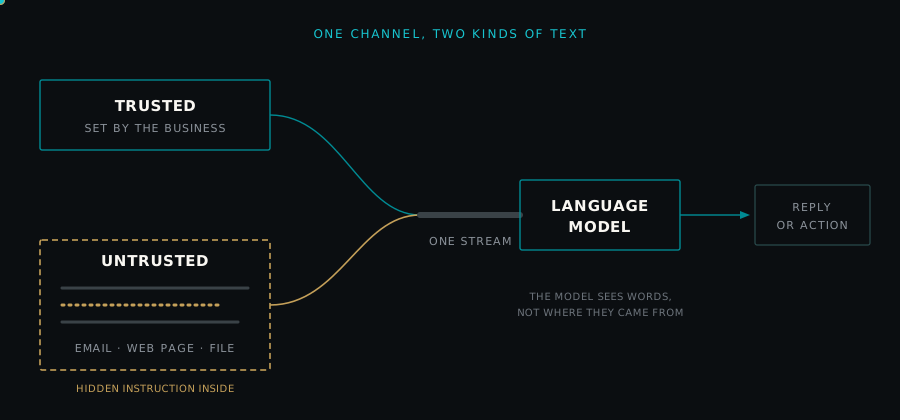
Language models are vulnerable because they receive everything as one stream of text. Your instructions, the customer's message, and the email or web page being read all arrive in the same channel, and the model has no reliable built-in way to treat some of it as commands and the rest as information.
NIST AI 100-2 puts it directly: underlying many security vulnerabilities in these applications is the fact that "data and instructions are not provided in separate channels to the LLM," which lets attackers use data channels to inject instructions, a flaw NIST compares to the one behind decades-old SQL injection attacks [3].
Two consequences follow for anyone designing an AI integration:
- Instructions in your system prompt are guidance, not a security boundary. Telling the model to disregard instructions found in documents helps, and OWASP recommends constraining model behavior in the system prompt [1]. But a well-crafted injection may still win, so security has to live in the systems around the model.
- Every new data source is a new way in. Connecting an assistant to email, files, search results, or a calendar expands what attackers can reach it through. NIST AI 600-1 notes that generative AI expands the available attack surface, since it is itself vulnerable to attacks such as prompt injection [2].
What does prompt injection look like in a real business?
Illustrative scenarios. The four examples below are hypothetical, built from attack patterns described by OWASP and NIST. They are not accounts of real incidents or real businesses, and they are deliberately conceptual: no working attack text is shown.
A website chat assistant
A car dealership runs a chat assistant on its website that answers questions about inventory, hours, and service appointments (the kind of assistant described in what an AI receptionist actually does). A visitor types a message designed to override its rules: asking it to reveal its internal instructions, to state a price it was never given, or to promise terms the dealership never offered. That last risk is one reason your AI should never guess prices. This is direct injection. OWASP's first example scenario is a support chatbot told to ignore its guidelines, query private data stores, and send emails [1].
If the assistant can only answer from approved content, the likely worst case is a wrong or embarrassing reply. If it is connected to a customer database or can send email, the same trick could expose data or take actions.
An inbox assistant reading customer emails
A real estate brokerage uses an assistant to summarize incoming inquiries and draft replies. An attacker sends an ordinary-looking email containing text a person would not notice, such as a tiny font or a color that matches the background, telling the assistant to include a particular link in its reply, or to gather recent messages and send them elsewhere. This is indirect injection. NIST AI 100-2 describes researchers showing that a model integrated into an email client could be prompted to forward certain emails to an attacker-controlled inbox [3].
An agent browsing web pages or reading uploaded documents
An AI agent is software that lets a model plan steps and use tools, such as a browser, a file reader, or an email sender, in a loop. Suppose an agent researches suppliers online, or reads documents customers upload. A web page or file can carry instructions aimed at the agent rather than the human reader. OWASP describes a user asking a model to summarize a web page whose hidden instructions make it insert an image link that exfiltrates the private conversation [1], and an applicant uploading a resume with split instructions that push a screening model toward a positive recommendation [1]. NIST AI 100-2 notes that because agents can take actions using tools, injections can enable attackers to hijack agents to execute arbitrary code or exfiltrate data [3].
A calendar invite with hidden instructions
An assistant that manages a calendar reads every invitation, including the description field, which anyone outside the business can fill in. An attacker sends an invite whose description contains instructions to the assistant: accept other meetings, share availability, or reply with the attendee list. If the assistant processes invitations automatically, nobody has to open the invite for its text to reach the model. It is the email pattern again, through a channel many businesses overlook.
What do attackers try to achieve with prompt injection?
NIST AI 100-2 says indirect prompt injection can violate at least three categories of attacker goals: availability, integrity, and privacy [3]. In business terms, that usually means one of four things.
- Exfiltrate data. Get the assistant to reveal or send out what it can see: customer records, documents, conversation history, or its own instructions. NIST describes injections that leak data by querying an attacker-controlled web address, and notes that features like markdown image rendering can be abused to exfiltrate data [3].
- Take unwanted actions. Make the assistant misuse its tools: send emails, change records, accept invitations, or run code. OWASP lists unauthorized access to functions and executing commands in connected systems among the possible outcomes [1].
- Change outputs. Quietly alter what the assistant tells people. NIST describes researchers producing incorrect summaries, inserting attacker-specified information, and hiding certain sources, and warns these capabilities could be used to recommend fraudulent products or redirect people to pages that spoof legitimate log-ins [3]. This is often the hardest to notice, because the reply still looks normal.
- Disrupt service. Make the assistant slow, useless, or unable to use a feature. NIST lists time-consuming background tasks and instructions that switch off capabilities among proof-of-concept availability attacks [3].
How bad any of this gets depends heavily on your architecture. OWASP states that severity depends largely on the business context and the agency with which the model is architected [1]. Agency is the amount of freedom an AI system has to act on its own: which tools it can call, with what permissions, and without whose approval.
Can prompt injection be fully prevented?
No. None of the primary sources reviewed here describes a complete fix. OWASP writes that "it is unclear if there are fool-proof methods of prevention for prompt injection" [1]. NIST AI 100-2 states that "current mitigations do not offer full protection against all attacker techniques" and suggests designing systems with the assumption that prompt injection is possible whenever a model is exposed to untrusted input [3].
Treat the model like a capable new employee who will sometimes believe a convincing forged memo. You would limit what one person can do alone, check unusual requests, and keep records. The same thinking applies here.
How do you prevent prompt injection? Layered defenses that reduce the risk
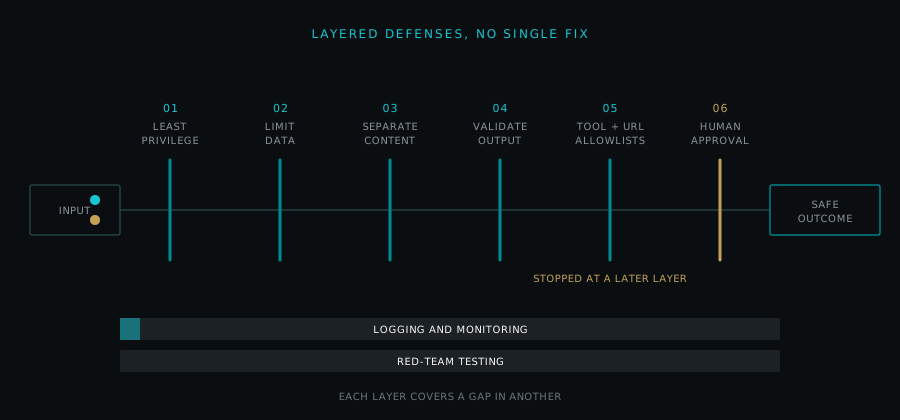
No control on this list is complete on its own, and even together they cannot rule out a successful attack. The goal is defense in depth: several independent layers, so that an injection that gets past one is caught or contained by the next. The joint government guidance Deploying AI Systems Securely, published in April 2024 by the NSA's AI Security Center with CISA, the FBI, and cyber agencies of Australia, Canada, New Zealand, and the United Kingdom, recommends strict access controls "employing the concepts of least privilege and defense-in-depth" [4].
1. Least privilege for tools and data
Least privilege means giving a system only the access it needs for its job and nothing more. OWASP recommends restricting the model's access privileges to the minimum necessary and handling functions in code rather than giving them to the model [1]. Its separate entry on Excessive Agency (LLM06) names three root causes: excessive functionality, excessive permissions, and excessive autonomy [5].
In practice, an assistant that summarizes email does not need permission to send it, and a tool that reads a calendar does not need permission to delete events. OWASP's own example of the fix is an email integration with a read-only scope [5].
2. Limit what data the assistant can see
An assistant cannot leak what it never sees. Scope each one to the records relevant to its task and the person it serves: a car dealership's website chat can answer from approved inventory and service information without access to customer financing files. The joint guidance makes a similar point in a different context: to protect model weights against model inversion, it recommends ensuring APIs "return only the minimal data required for the task" [4]. Applying that principle to business data is our extension, not the guidance's own advice.
3. Separate trusted instructions from untrusted content
Mark clearly, in how the system is built, which text comes from you and which comes from outside. OWASP recommends that teams "Separate and clearly denote untrusted content to limit its influence on user prompts" [1]. NIST AI 100-2 describes related techniques, including filtering instructions out of third-party data and "spotlighting," which helps a model distinguish trusted from untrusted data, and notes that designers who assume injection is possible may use multiple models with different permissions [3]. A common version of that idea keeps the model that reads untrusted content away from sensitive tools. These measures reduce risk; they do not eliminate it.
4. Treat model output as untrusted and validate it before acting
Anything the model produces should be checked by ordinary code before it touches another system. OWASP's entry on Improper Output Handling (LLM05) advises: "Treat the model as any other user, adopting a zero-trust approach" [6]. It also recommends defining expected output formats and using deterministic code to validate them [1].
For example, if the assistant proposes booking an appointment, code should confirm the request is in the expected format, the time slot exists, and the customer record matches, before anything is saved. If the assistant writes a reply that will appear on a web page, the output should be encoded so it cannot run as code in a browser [6].
5. Allowlists for tools, recipients, and web addresses
An allowlist is a fixed list of things that are permitted, with everything else blocked by default. Allow the assistant to call only named tools, send only to approved domains or existing contacts, and fetch or link only to approved web addresses. Many exfiltration techniques depend on the model reaching an address the attacker controls, so blocking unknown destinations closes a common path, though not every one. The joint guidance recommends configuring firewalls with allow lists as part of hardening the deployment environment [4].
6. Human approval for consequential actions
Some actions should never run on the model's say-so alone. OWASP recommends human-in-the-loop controls for privileged operations [1]. Decide in advance which actions count as consequential for your business, such as sending money, changing a customer's record, sharing a document outside the company, committing to a price or term, or deleting anything, and route those to a person.
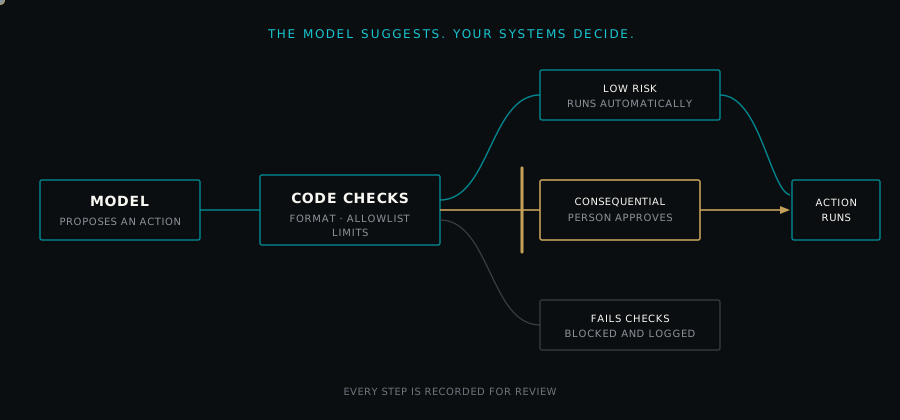
Make approvals meaningful: show the person exactly what will happen and which content triggered the request, not just a summary written by the same model that may have been manipulated.
7. Logging and monitoring
The joint guidance advises organizations to "Collect logs to cover inputs, outputs, intermediate states, and errors; automate alerts and triggers" [4], and to watch for high frequency or repetitive inputs as possible signs of automated compromise attempts [4]. For AI assistants, log the content the model read, the tools it called, the parameters it used, and who approved what. Alert on unusual patterns, such as an assistant suddenly contacting new addresses or calling tools it rarely uses.
8. Red-team testing
Red-team testing means deliberately attacking your own system, in a controlled and authorized way, to find weaknesses before someone else does. NIST AI 600-1 suggests AI red-teaming to assess resilience against attacks including prompt injection [2]. OWASP recommends regular penetration testing that treats the model as an untrusted user to test trust boundaries and access controls [1]. The joint guidance recommends engaging external security experts for audits and penetration testing [4]. Test again whenever you add a data source or tool.
Which defense stops what? A comparison table
| Defense layer | What it stops or limits | What it does not stop |
|---|---|---|
| Least privilege for tools | Damage from hijacked actions, because the assistant lacks the permission to do harm | Misleading replies or leaks of data the assistant is allowed to read |
| Limiting data access | Leaks of records the assistant has no reason to see | Misuse of the data it legitimately needs |
| Separating trusted and untrusted content | Some injections, by lowering the weight the model gives outside text | Determined or novel injections; it is a risk reducer, not a boundary |
| Validating model output | Malformed or out-of-policy actions, and output that could run as code downstream | Well-formed actions that are valid but unwanted |
| Allowlists for tools, recipients, and addresses | Sending data to attacker addresses; calling tools outside the approved set | Abuse that stays within approved tools and destinations |
| Human approval | Consequential actions running without a person's decision | Changed outputs that never trigger an action; approver fatigue |
| Logging and monitoring | Silent, repeated, or unnoticed abuse; it enables investigation and response | The first occurrence of an attack, in real time |
| Red-team testing | Known weak points going unnoticed before launch or after changes | Attack techniques nobody has thought of yet |
Every layer has a gap that another layer partly covers, which is why they belong together, and why some risk always remains.
How should a business govern AI assistant security?
A few governance habits make the technical controls stick.
- Keep an inventory of every AI assistant or agent in use: what data it can read, what tools it can call, and who owns it.
- Classify actions by consequence. Agree in writing which actions an assistant may take alone, which need approval, and which it may never take.
- Assign an owner accountable for each assistant's permissions, logs, and testing, who can switch it off quickly.
- Plan the response: how you disable a manipulated assistant, who reviews the logs, and how you notify affected people. Check legal notification obligations with your own counsel.
- Treat new vendor connectors and features as changes to your attack surface, not just new conveniences.
The joint guidance notes that as new weaknesses are discovered, organizations will need to update their AI systems to address the changing risks [4].
What should you ask an AI vendor about prompt injection?
Ask in writing, and keep the answers.
- How do you handle prompt injection, and what do you assume will get through? A credible answer describes layers and admits limits; a claim of immunity is not credible, given what OWASP and NIST say [1][3].
- What tools and permissions does the assistant have by default, and can we reduce them? Look for read-only options and per-tool controls.
- What data can the assistant see, and can we scope it per user or per task?
- How do you separate our instructions from outside content such as emails, web pages, and uploads?
- Is model output validated by code before any action runs?
- Can we restrict which recipients, domains, and web addresses the assistant can contact or link to?
- Which actions require human approval, and can we add our own?
- What do you log, for how long, and can we export it? Ask whether logs include the content the model read and the tools it called.
- Do you red-team or penetration test for indirect prompt injection? How often, and who does it?
- How, and how quickly, will you tell us about a security issue affecting our assistant?
For a broader buying checklist, see our guide on how to evaluate an AI tool before you pay for it.
Frequently asked questions
What is the difference between prompt injection and jailbreaking? OWASP describes jailbreaking as a form of prompt injection in which the attacker gets the model to disregard its safety protocols entirely. Prompt injection is the broader category: any input that alters the model's behavior or output in unintended ways. For a business, both matter, but injection that triggers actions or leaks data is usually the larger operational risk.
Can a better system prompt stop prompt injection? A clear system prompt helps, and OWASP recommends constraining the model's role and telling it to ignore attempts to change its core instructions. It is not a security boundary, because a crafted injection may still override it. Stronger protection comes from limiting permissions, validating outputs, and requiring approval for consequential actions.
Is indirect prompt injection a risk if my assistant only reads email? Yes. Anyone can send you an email, so anyone can put text in front of your assistant. If the assistant only summarizes, the main risk is a misleading summary; if it can also reply, forward, or open links, the risk includes data leaving your business. Keep a reading assistant read-only unless there is a clear reason to grant more.
Do AI agents face more prompt injection risk than chat assistants? Generally, yes, because agents read more outside content and can take actions with tools. NIST notes that agent tool use can let attackers hijack an agent to run code or exfiltrate data. The more an agent can do on its own, the more important least privilege, allowlists, and human approval become.
How often should we test an AI assistant for prompt injection? Test before launch and again whenever you add a data source, tool, or permission, since each change can open new paths for attack. Scheduled testing on top of that is good practice, and OWASP, NIST, and the joint government guidance all recommend adversarial or penetration testing.
If you want a second look at how these layers apply to an assistant you use or plan to build, Sherwood is glad to talk it through.
This article is general information about software security practices, not legal advice. For notification duties, contracts, or regulatory obligations, consult your own counsel.