
AI agent governance: how to control AI agents that take actions
When AI books, sends, posts, updates, or refunds, a wrong answer becomes a real event. Here is how to sort agent actions by risk and match each one to the right permissions, approvals, limits, logs, and owner.

AI agent governance means deciding what an agent may do on its own, what needs a person's approval, and how every action is recorded and reversed. Sort each action by how hard it is to undo and how much harm a mistake would cause, then match controls to that level: permissions, previews, approvals, limits, logs, and a named owner.
This guide is for owners and operators who already use AI to answer questions and now want it to book, send, post, update, or refund. It covers an action taxonomy, the controls that matter, and how to assign accountability, using NIST and OWASP guidance as of October 2026.
What changes when AI takes actions instead of answering?
An AI agent is an AI system that can call tools or connect to other software to carry out tasks, not just produce text. Once an agent can book an appointment, send an email, post to social media, update a customer record, or issue a refund, a wrong answer stops being a wrong sentence on a screen. It becomes a real event: a customer receives the message, the calendar fills, the money moves.
Three things change:
- Mistakes leave the building. A wrong draft can be deleted. A sent reply cannot be unsent.
- Speed multiplies errors. A person who misreads an instruction makes one mistake. An agent that misreads it can repeat the mistake hundreds of times before anyone looks.
- Inputs become attack surface. An agent that reads emails, web pages, or documents can be steered by text hidden inside them.
That last point has a name. Prompt injection is an attack in which someone crafts input that makes an AI system behave in ways its owner did not intend. NIST's Generative AI Profile describes indirect prompt injection as attackers placing prompts "into data likely to be retrieved," so the agent picks them up while doing its normal work [2]. For an agent that only answers, that is a nuisance. For one that can send email or move money, it is a control problem.
The OWASP Top 10 for LLM Applications (2025 edition) names the resulting risk Excessive Agency: damaging actions performed in response to unexpected, ambiguous, or manipulated model outputs [4]. OWASP traces the root cause to three things: "excessive functionality; excessive permissions; excessive autonomy" [4]. Every control in this guide shrinks one of those three.
How do you classify AI agent actions by risk?
Classify each action on two axes: reversibility (how easily you can undo it) and impact (how much harm a mistake would cause to customers, money, or legal standing). Four tiers cover most business use.
- Read-only. The agent looks something up and changes nothing. Checking store hours, reading a calendar, pulling an order status.
- Reversible write. The agent changes something inside your own systems that you can change back. Updating a contact record, tagging a lead, drafting a reply into a folder, placing a tentative hold on a calendar.
- Irreversible or external. The action reaches someone outside your business or cannot be fully undone. Sending an email or text, publishing a post, confirming an appointment with a customer, deleting data.
- Financial or legal. The action moves money or creates an obligation. Issuing a refund, applying a discount, changing a listed price (see why your AI should never guess prices), accepting terms, signing or sending an agreement.
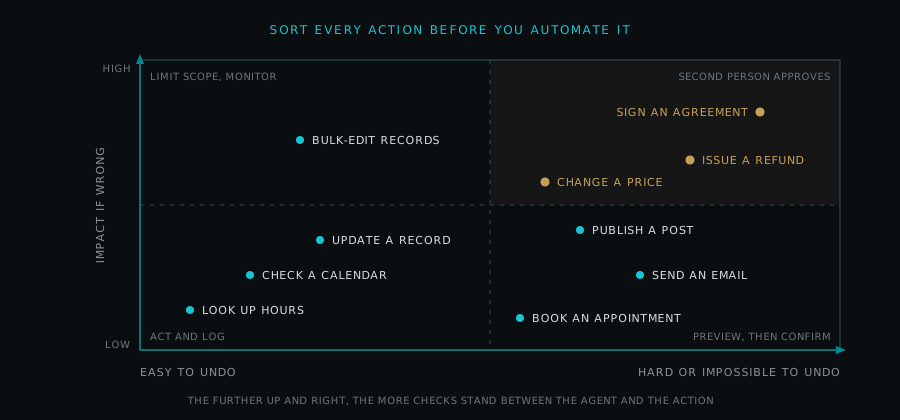
Two notes on sorting. First, classify the worst plausible version of the action, not the typical one. A refund tool that usually issues small refunds still belongs in tier 4 if nothing stops it from issuing a large one. Second, the tier belongs to the action, not the agent. One agent can hold tier 1 and tier 3 abilities at the same time, and each needs its own control.
Which AI agent governance controls fit each type of action?
Use this as a starting default, then adjust for your own risk tolerance.
| Action type | Example | Default control | Approval |
|---|---|---|---|
| Read-only | A car dealership agent checks service bay availability | Read-only credentials scoped to the needed data; log the lookup | None needed |
| Reversible write | Agent updates a lead's status in the customer database | Write access to named fields only; change history kept; daily review sample | None per action; owner reviews samples |
| Irreversible or external (routine) | Agent publishes a scheduled social post or sends a booking confirmation | Preview of the exact content; rate limit; audit log | The person's explicit submit counts as approval |
| Irreversible or external (non-routine) | Agent sends a one-off email to a customer list or deletes records | Dry run showing every recipient or record affected; rate limit | A person confirms each batch |
| Financial or legal | Agent issues a refund, applies a discount, or sends an agreement | Spend cap per action and per day; separate credential; full audit trail | A second, named person approves before execution |
The pattern: approval effort rises with impact and irreversibility, and drops for routine work the person has already reviewed. A second approver on every look-up wastes attention; unattended refunds waste money.
What is least privilege for AI agents?
Least privilege is the principle that an agent gets only the access it needs for its task and nothing more. It is the foundation for every other control, because an agent cannot misuse an ability it does not have.
OWASP's first four mitigations for Excessive Agency all apply it [4]:
- Minimize tools. If the agent does not need to fetch web pages, do not give it a web-fetch tool.
- Minimize what each tool can do. OWASP's example: an extension that summarizes email may only need to read mail, so it should not be able to delete or send.
- Avoid open-ended tools. A tool that runs any command is far riskier than one that performs a single defined task.
- Minimize downstream permissions. If the agent needs to read a products table, its database identity should not be able to write to it, or read other tables.
One OWASP recommendation deserves special emphasis for anyone designing agent systems: "Implement authorization in downstream systems rather than relying on an LLM to decide if an action is allowed or not" [4]. In plain terms, the instruction "never issue refunds over a set amount" belongs in the payment system's rules, not only in the agent's prompt. A prompt is guidance. A permission is a wall.
Practical scoping checklist
- List every tool the agent can call and remove any it did not use in testing, including leftovers from development. OWASP notes that a plugin trialled and then dropped can remain available to the agent [4].
- For each tool, list the exact fields, records, or recipients it can touch.
- Confirm limits are enforced by the system receiving the request, not by the agent.
Why should every AI agent have its own credentials?
Each agent should sign in with its own identity, never a shared admin account and never a staff member's personal login. Separate credentials give you three things:
- Attribution. The audit log shows which agent acted, not just "the system."
- Containment. If one agent misbehaves or its key leaks, you revoke that one key without stopping everything else.
- Correct scope. OWASP recommends executing actions on downstream systems in the context of the specific user, with the minimum privileges needed, and lists a generic high-privileged identity as an example of excessive permissions [4]. An agent acting for one customer should not hold keys that reach every customer's records.
Store these credentials in a proper secrets manager, rotate them on a schedule, and never paste them into prompts or documents.
What is human-in-the-loop approval, and when is it required?
Human-in-the-loop approval means a person must approve an action before the agent carries it out. OWASP lists it as a core mitigation: require a human to approve high-impact actions before they are taken [4]. Its own example is directly relevant: an application that creates and posts social media content on a user's behalf "should include a user approval routine" in the posting step [4].
The key design question is what counts as approval:
- Routine, reviewed work: the person's explicit submit is the approval. If someone reads the finished post or confirmation and presses submit, a second "are you sure?" adds friction without adding safety. In Sherwood's own social media product, submitting a post is the approval.
- Non-routine external actions: a person confirms the specific batch, with a preview of every recipient or record.
- Money and legal commitments: a second, named person approves, separate from whoever requested the action. This is the same separation of duties many businesses already use for payments.
NIST's AI Risk Management Framework (AI RMF 1.0), a voluntary framework released in January 2023, sets out two relevant outcomes: "Processes for human oversight are defined, assessed, and documented" (MAP 3.5), and policies that "define and differentiate roles and responsibilities for human-AI configurations and oversight of AI systems" (GOVERN 3.2) [1]. It also notes that some AI systems may not require human oversight while others specifically do [1]. Writing down which tier needs which approval is one practical way to act on those outcomes.
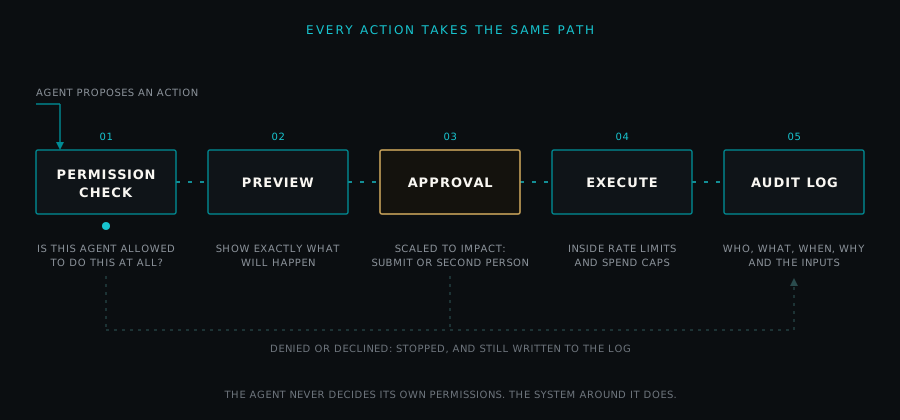
Watch for rubber-stamping
Approval only works if the approver actually looks. NIST describes automation bias as "excessive deference to automated systems" and notes that it can make other risks worse [2]. An approver clicking through dozens of requests a day is decoration, not control. Keep queues short by automating the truly routine tier, and show approvers the exact change, not a summary.
What are dry runs and previews for AI agents?
A dry run is a rehearsal in which the agent works out exactly what it would do, without doing it. A preview shows that result to a person in the form the recipient will see.
Good previews show:
- The exact text, image, or record change, not a description of it
- Every recipient, record, or account affected, with a count
- The amount and destination of any money movement
- What can and cannot be undone afterward
For a real estate office, a listing announcement preview should show the exact post, the listing details pulled from the record, and the accounts it will publish to, so the approver checks facts against the listing.
How do rate limits and spend caps contain AI agent mistakes?
A rate limit caps how many actions an agent can take in a set period. A spend cap caps how much money it can commit per action, per day, or per month. Neither prevents a mistake. Both limit how large one can grow.
OWASP lists rate limiting among the measures that reduce damage, because it buys time for monitoring to catch a problem before significant harm occurs [4]. Set limits from observed normal volume, with headroom:
- Messages per hour and per recipient
- Posts per day per account
- Records changed per run
- Refund or discount value per action and per day
- Paid usage of the AI service itself, with an alert before the cap is reached (see know your AI usage)
When an agent hits a limit, it should stop and alert a person, not quietly queue the excess or fail without a reason.
What should an AI agent audit log record?
An audit log is a tamper-resistant record of every action an agent attempted, whether it ran or not. For agents, a useful entry answers six questions:
- Who: which agent, which credential, and which person (if any) requested or approved it
- What: the exact action and its parameters, such as the recipient, record ID, amount, or post content
- When: a timestamp for request, approval, and execution
- Why: the instruction or trigger that led to the action
- Inputs: the data the agent relied on, including any documents, messages, or retrieved pages
- Outcome: success, failure, denial, or rollback, with the system's response
Inputs matter most, because prompt injection arrives through them. If an agent sends an odd email, you need to see which incoming message or page steered it.
NIST's Generative AI Profile notes that logging, recording, and analyzing incidents, along with change management records and version history, help the people responding to an incident [2]. It also suggests a minimum set of fields for incident reports, including system ID, title, reporter, date, description, impacts, and stakeholders affected (GV-4.3-002) [2]. Log your agent's own configuration changes too: a prompt edit is a change to the system.
How do rollback and a kill switch work for AI agents?
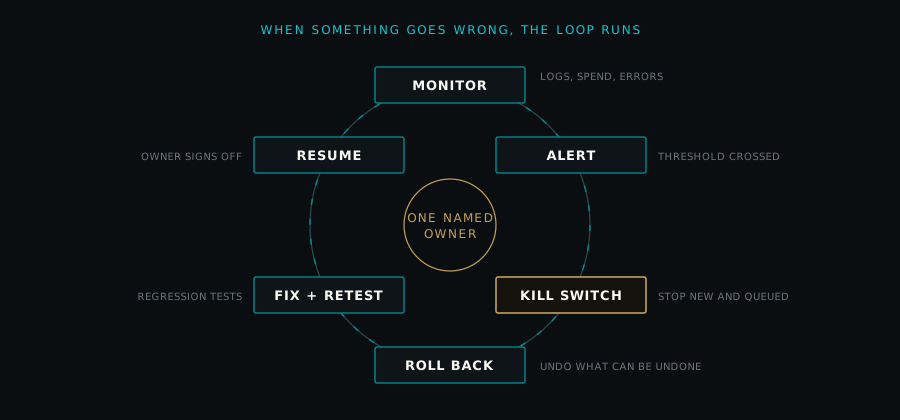
Rollback is the ability to reverse an agent's actions. A kill switch is the ability to stop an agent from taking any further actions, immediately, without a code change.
NIST's AI RMF calls for mechanisms, with assigned responsibilities, to "supersede, disengage, or deactivate AI systems that demonstrate performance or outcomes inconsistent with intended use" (MANAGE 2.4) [1]. The Generative AI Profile adds that protocols should ensure systems "are able to be deactivated when necessary" (GV-1.7-001) and that specific deactivation criteria should be set and regularly reviewed (MG-2.4-004) [2].
Design for both before launch:
- Kill switch: one control, reachable by the named owner and a backup, that revokes the agent's credentials at the systems it acts on and cancels anything it has already queued or scheduled. Test it. A switch that has never been flipped is a hope, not a control.
- Rollback by tier: reversible writes should keep the prior value so they can be restored. External actions often cannot be reversed, so plan a correction instead, such as a follow-up message or a deleted post with an explanation. Give each action a unique ID so a retry after a timeout does not send or charge twice.
- Written criteria: decide in advance what triggers the switch, for example an error rate above a threshold, any action outside the agent's scope, or any unexplained money movement.
How do you monitor AI agents and set alerts?
Monitoring is the ongoing review of what an agent does after launch. NIST's AI RMF calls for post-deployment monitoring plans that include ways to capture user input, appeal and override, incident response, recovery, and change management (MANAGE 4.1) [1].
Useful signals to watch:
- Volume of actions compared with normal
- Denials and failed actions, which often signal a broken integration or a probing attack
- Actions near or at limits
- Customer complaints or replies that mention the agent's action
- Spend against budget
Route alerts to a person who can act on them, with an expected response time. An alert that lands in an unread inbox is a log entry, not an alert.
How should you test AI agents before and after launch?
Test agents the way you would test any system that can spend money or speak for you, and apply the same scrutiny you would use to evaluate an AI tool before paying for it.
Before launch:
- Run the agent against realistic scenarios from your own business in a test environment, with test accounts and test payment modes.
- Try to make it misbehave. NIST's Generative AI Profile describes red-teaming as exercises, often in a controlled environment, to find potential adverse behavior and stress test safeguards, before or after release [2]. Include messages that contain hidden instructions, requests just outside the agent's scope, and ambiguous requests.
- Confirm every permission boundary holds when the agent asks to cross it.
- Flip the kill switch and confirm the agent stops.
After every change: a new prompt, tool, model version, or connected system can change behavior. Keep a fixed set of test cases, including past failures, and rerun them as regression tests before the change goes live. If a case that used to pass now fails, the change waits.
What does incident response look like for AI agents?
An AI incident is any event in which an agent's action caused, or nearly caused, harm or behavior outside its intended use. Plan the response in advance:
- Contain. Flip the kill switch or narrow permissions.
- Assess. Use the audit log to find every affected action, customer, and record.
- Correct. Roll back what you can; contact affected people where appropriate.
- Find the cause. Was it a bad input, a missing permission boundary, a model change, or a gap in the approval tier?
- Fix and retest. Add the incident to your regression tests.
- Review. NIST's Generative AI Profile suggests after-action assessments to verify response and recovery processes were followed and effective (MG-4.3-001) [2].
Some incidents may carry notification or reporting obligations depending on what was affected. That is a question for your own counsel.
Who is accountable for an AI agent?
Every agent needs one named owner: a specific person, not a department or a vendor, who decides its scope, approves changes, watches its monitoring, and holds the kill switch.
NIST's AI RMF has four functions, Govern, Map, Measure, and Manage, and treats Govern as cross-cutting, informing the other three [1]. Its GOVERN 2.1 outcome is that roles, responsibilities, and lines of communication for managing AI risk "are documented and are clear" throughout the organization, and GOVERN 2.3 places responsibility for AI risk decisions with executive leadership [1]. The Generative AI Profile suggests that inventories of AI systems record human oversight roles and responsibilities (GV-1.6-003) [2].
A RACI chart is a simple way to document this. It assigns, for each activity, who is Responsible (does the work), Accountable (owns the outcome, exactly one person), Consulted (gives input), and Informed (is kept up to date).
| Activity | Responsible | Accountable | Consulted | Informed |
|---|---|---|---|---|
| Define agent scope and permissions | Builder | Agent owner | Operations lead | Leadership |
| Approve financial or legal actions | Second approver | Agent owner | Finance | Leadership |
| Review monitoring and alerts | Operations lead | Agent owner | Builder | Leadership |
| Flip kill switch and run incident response | Agent owner or backup | Agent owner | Builder, counsel as needed | Affected staff and customers as appropriate |
| Approve changes and regression results | Builder | Agent owner | Operations lead | Leadership |
In a lean business, one person may hold several of these roles. That is fine, as long as the second approver for money is never the same person who requested it.
The NIST AI RMF Playbook offers suggested actions for each of these outcomes; NIST says it is voluntary and not a checklist to follow in its entirety [3]. As of October 2026, the Playbook page states that the AI RMF 1.0 is being updated and that the Playbook will follow the revision [3].
Frequently asked questions
What is AI agent governance? AI agent governance is the set of rules and controls that decide what an AI agent may do on its own, what needs a person's approval, and how its actions are recorded, monitored, and reversed. It covers permissions, approvals, limits, logs, testing, incident response, and a named owner for each agent.
What is excessive agency in AI? Excessive agency is the OWASP name for the risk that an AI system takes damaging actions because of unexpected, ambiguous, or manipulated outputs. OWASP traces it to giving an agent too much functionality, too many permissions, or too much autonomy. Narrow tools, least-privilege access, and approval for high-impact actions reduce it.
Does every AI agent action need human approval? No. Approval should match the action's impact and how hard it is to undo. Read-only look-ups and easily reversed internal updates can run without approval if they are logged. External actions need at least the person's explicit submit, and financial or legal actions should need a second named person.
What should an AI agent audit log include? Record which agent and credential acted, who requested or approved the action, the exact action and its parameters, timestamps, the trigger or instruction, the inputs the agent relied on, and the outcome. Logging inputs matters because manipulated inputs are a common way agents are steered off course.
What is a kill switch for an AI agent? A kill switch is a control that immediately stops an agent from taking further actions, including anything it has already queued, without needing a code change. The agent's named owner and a backup should be able to reach it, and it should be tested before launch. Written criteria should say in advance when it gets used.
Is the NIST AI Risk Management Framework mandatory? No. NIST describes the AI RMF as voluntary, and its Playbook of suggested actions is voluntary too. Many organizations use it as a shared structure for AI risk work, but any legal obligations come from the laws that apply to your business, not from the framework itself.
Sherwood designs the AI agents it builds around these same controls.
This article is general guidance on operating AI systems, not legal advice. For notification duties, contract terms, or regulatory obligations, check with your own counsel.